Writing a simple hello world app in Go is pretty simple. However, knowing the requirements of the task it was necessary to research possible problems and best practices since the application will be deployed to the K8s cluster.
- Visit https://hello.devops-task.site/ for a live demo of the app
- Github repository
- Dockerhub
-
Regarding the code itself, important things to include were healthcheck and readiness for k8s, and following best practices regarding writing Go code.
-
Great post on the production-ready K8s app was used for information, but the provided configuration was overkill for this task so following all the steps was unnecessary.
-
This simple app has 3 endpoints defined,
/probe/liveness,/probe/readiness, and/.package main import ( "fmt" "log" "net/http" ) const ( healthzPath = "/probe/liveness" readinessPath = "/probe/readiness" // app endpoint defined bellow )
-
The endpoints are also trivial and just print out the necessary information.
func hello(w http.ResponseWriter, _ *http.Request) {
	fmt.Fprintf(w, "Hello Filip")
}

func healthz(w http.ResponseWriter, _ *http.Request) {
	fmt.Fprintln(w, "Healthy!")
}

func readyz(w http.ResponseWriter, _ *http.Request) {
	fmt.Fprintln(w, "Ready!")
}
-
The port is hardcoded. Copying the .env file and using
oslibrary was considered, however, it’s not good practice to copy sensitive data to the container since it’s public. It was also possible to use GitHub secrets and to include the port that way, however, due to the simplicity of the app it was skipped.func handleRequests() { http.HandleFunc("/", hello) http.HandleFunc(healthzPath, healthz) http.HandleFunc(readinessPath, readyz) port := "11000" // if port == "" { // log.Fatal("Port is not set.") // } log.Printf("Server listening on port %s...", port) if err := http.ListenAndServe(":"+port, nil); err != nil { log.Fatalf("Server failed to start: %v", err) } } func main() { handleRequests() }
-
While writing Dockerfile, research had to be conducted in order to find the smallest possible image while having the required libraries and dependencies.
-
Distroless images are a quite popular choice, built with Google's Bazel.
-
Two images were considered:
base-debian11andstatic-debian11. The difference is thatstatic-debian11requires the Go app to be built using static linking, which bundles all the object files generated during compilation time into a single executable file. That means all the necessary libraries and dependencies are included within the executable file itself. This has potential drawbacks.- Larger file size: Static linking can result in larger binary files, as all the required libraries are included in the binary. This can increase the size of the container image and affect the overall performance of the application.
- Security risks: Including all the libraries in the binary file can also introduce security risks. If any of the libraries are found to have vulnerabilities, all instances of the application will need to be updated, rather than just updating the library itself.
- Lack of flexibility: Static linking makes it difficult to update or replace individual libraries, as all the libraries are bundled together.
-
The Dockerfile used is a multi-stage build Dockerfile. The benefit is that it allows to create a smaller final image by only including the necessary artifacts from the build stage.
-
The first stage uses the Linux Alpine Go image, then downloads and verifies modules, builds the Go binary executable file, and places it in the
/app/bindirectory within the container.FROM golang:alpine AS build WORKDIR /app COPY . . RUN go mod download && go mod verify RUN go build -v -o /app/bin/app .
-
The second stage uses base-debian11 and uses the previous stage to build the app, exposes port (not really) 11000, and sets the user to run the container as a non-root user, which is considered best practice for security reasons.
FROM gcr.io/distroless/base-debian11 as release-debian
WORKDIR /
COPY --from=build /app/bin/app /app
EXPOSE 11000
USER nonroot:nonroot
ENTRYPOINT ["/app"]
-
The automation process of building and deploying the app to both dockerhub and Kubernetes cluster is done through GitHub Actions.
-
Three pipelines are defined
release.yml,deploy.ymlanddestroy.yml:# release.yml name: Release on: push: branches: [master] jobs: release: name: Release runs-on: ubuntu-latest steps: - name: Checkout uses: actions/checkout@v3 with: persist-credentials: false - name: Setup Node.js uses: actions/setup-node@v1 with: node-version: 18.x - name: Release env: GITHUB_TOKEN: ${{ secrets.PAT }} run: npx semantic-release
-
This pipeline triggers when a new version of code is pushed to the master branch and uses semantic-release package.
-
A brief overview of the steps:
Verify Conditions Verify all the conditions to proceed with the release. Get last release Obtain the commit corresponding to the last release by analyzing https://git-scm.com/book/en/v2/Git-Basics-Tagging. Analyze commits Determine the type of release based on the commits added since the last release. Verify release Verify the release conformity. Generate notes Generate release notes for the commits added since the last release. Create Git tag Create a Git tag corresponding to the new release version. Prepare Prepare the release. Publish Publish the release. Notify Notify of new releases or errors.
# deploy.yml
name: Deploy

on:
  push:
    tags:
      - 'v*'

jobs:
  deploy:
    name: Deployment
    runs-on: ubuntu-latest
    steps:
      - name: Checkout
        uses: actions/checkout@v3

      - name: Get the version
        id: get-tag
        run: echo ::set-output name=tag::${GITHUB_REF/refs\/tags\//}

      - name: Login to Docker Hub
        uses: docker/login-action@v1
        with:
          username: ${{ secrets.DOCKER_HUB_USERNAME }}
          password: ${{ secrets.DOCKER_HUB_ACCESS_TOKEN }}

      - name: Set up Docker Buildx
        uses: docker/setup-buildx-action@v1

      - name: Build and push
        uses: docker/build-push-action@v2
        with:
          context: .
          file: Dockerfile
          target: release-debian
          push: true
          tags: ${{ secrets.DOCKER_HUB_USERNAME }}/devops-task:${{steps.get-tag.outputs.tag}}
          cache-from: type=registry,ref=${{ secrets.DOCKER_HUB_USERNAME }}/devops-task:buildcache
          cache-to: type=registry,ref=${{ secrets.DOCKER_HUB_USERNAME }}/devops-task:buildcache,mode=max

      - name: Deploy to cluster
        uses: wahyd4/kubectl-helm-action@master
        env:
          KUBE_CONFIG_DATA: ${{ secrets.KUBE_CONFIG_DATA }}
        with:
          args: |
	            helm upgrade --install hello helm/app --namespace hello --create-namespace --values hello-values.yaml
- This is the deployment pipeline, responsible for getting the new version, building and deploying the docker image to dockerhub, and deploying to the K8s cluster with marketplace action
wahyd4/kubectl-helm-action@master. - Note that cache-from and cache-to were used, this is allowed by docker buildx, more information about that is here.
- Deploy to cluster step is using Kubernetes configuration provided by Linode and encoded into base64 string
# destroy.yml
name: Destroy

on:
  workflow_dispatch:

jobs:
  deploy:
    name: Destroy
    runs-on: ubuntu-latest
    steps:
      - name: Checkout
        uses: actions/checkout@v3

      - name: Deploy to cluster
        uses: wahyd4/kubectl-helm-action@master
        env:
          KUBE_CONFIG_DATA: ${{ secrets.KUBE_CONFIG_DATA }}
        with:
          args: |
            helm uninstall hello -n hello --wait
          # helm uninstall hello -n hello --wait --dry-run # stimulate uninstall
- Finally, the destroy pipeline which can be triggered only manually, uninstalls helm configuration with one command
-
-
While choosing the proper cloud provider which will host our Kubernetes cluster, Linode was chosen since AWS was too expensive, Google didn’t quite work etc.
-
Linode has really good docs explaining the basics of Kubernetes and docs that explain in detail how to setup Load Balancing and TLS using their cloud
-
The Shared CPU small instance was chosen since this is a very simple app.
-
Helm was used to deploy charts for ingress, cert-manager, and the app itself. GoLand has a nice feature for generating a pretty good starting point. Using the Kubernetes addon, these initial files were generated:
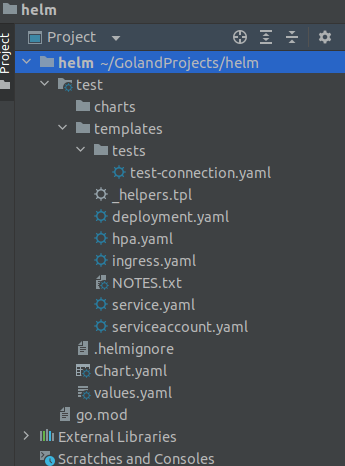
-
After defining the needed values in hello-values.yaml all that was left was to configure templates accordingly which took a lot of time.
-
Important information was to set the repository and tag name of the image and define ports and endpoints for our app. While configuring the image section, it was discovered that Kubernetes actually uses
docker pullunder the hood, which means there is no need to specify dockerhub as a registry in use. -
Next was the ingress configuration, which required a lot of research. Thankfully Linode guide was very helpful.
nameOverride: hello

deployment:
  image:
    repository: zjalicf/devops-task
    tag: "v1.1.1"
  containerPort: 11000
  probes:
    initialDelaySeconds: 3
    livenessPath: /probe/liveness
    readinessPath: /probe/readiness
  replicaCount: 1

service:
  type: ClusterIP
  port: 80

ingress:
  enabled: true
  annotations:
    kubernetes.io/ingress.class: nginx
    cert-manager.io/cluster-issuer: "letsencrypt-prod"

  tls:
  - hosts:
    - hello.devops-task.site
    secretName: devops-task-tls-secret
  hosts:
    - host: hello.devops-task.site
      paths:
        - path: /
          pathType: ImplementationSpecific
-
Linode’s DNS service simply does not work properly since after more than 48 hours purchased domain still didn’t propagate, so Namecheap was used to obtain the domain.