A comprehensive tool for solving linear programming problems, offering multiple interfaces including a command-line solver, a Domain Specific Language (DSL), and a graphical user interface (GUI).
The core solver is implemented using scipy.optimize.linprog and provides the fundamental capabilities for solving linear programming problems. It handles maximization and minimization, various inequality types (<=, >=, <, >), and equality constraints (=).
In addition to the scipy-based solver, the project includes a manual implementation of the Dual Simplex algorithm in dual_simplex.py. This method is particularly useful for problems where the initial basic solution is primal infeasible (i.e., some right-hand side values are negative). The dual simplex iteratively adjusts the solution to achieve feasibility and optimality.
The DualSimplex class supports both maximization and minimization problems with inequality constraints of the form Ax <= b.
Example Usage (Dual Simplex):
from dsl import DSL

problem = DSL("dual.lp")  # or any .lp file
dual_solver = problem.to_dual_simplex()
solution, optimal_value = dual_solver.solve()
print(f"Solution: {solution}")
print(f"Optimal value: {optimal_value}")
The dual simplex implementation handles cases where the initial tableau has negative b values by performing dual pivots, and switches to primal pivots when necessary to reach optimality.
Define your linear programming problems using a human-readable string format. This DSL supports both direct string input and loading from standard .lp files. It automatically handles variable types, including "free" variables by converting them into a pair of non-negative variables.
Example Usage (String Input):
from dsl import DSL

problem = DSL("""
MINIMIZE z = 3*x1 + 5*x2
SUBJECT TO
    2*x1 + x2 >= 8
    x1 + 3*x2 >= 9
    x1 <= 5
    x2 >= 1
BOUNDS
    x1 >= 0
    x2 free
""")

simplex = problem.to_simplex()
simplex.solve_problem()
simplex.show_results()

# Or use dual simplex
dual_solver = problem.to_dual_simplex()
solution, optimal_value = dual_solver.solve()
print(f"Solution: {solution}, Value: {optimal_value}")
Example Usage (LP File Input):
from dsl import DSL

# Assuming 'my_problem.lp' contains the problem definition
problem = DSL("my_problem.lp")
simplex = problem.to_simplex()
simplex.solve_problem()
simplex.show_results()

# Or use dual simplex
dual_solver = problem.to_dual_simplex()
solution, optimal_value = dual_solver.solve()
print(f"Solution: {solution}, Value: {optimal_value}")For a more integrated and programmatic approach, use the Pythonic DSL inspired by sympy. Define variables and construct your objective function and constraints directly using Python objects and operators.
Example Usage:
from pythonic_dsl import Model, Var, maximize

m = Model("example_lp")

x1 = Var("x1", low=0)
x2 = Var("x2", low=0)

m += maximize(5 * x1 + 4 * x2)
m += (6 * x1 + 4 * x2 <= 24)
m += (x1 + 2 * x2 <= 6)
m += (-x1 + x2 <= 1)
m += (x2 <= 2)

result = m.solve()
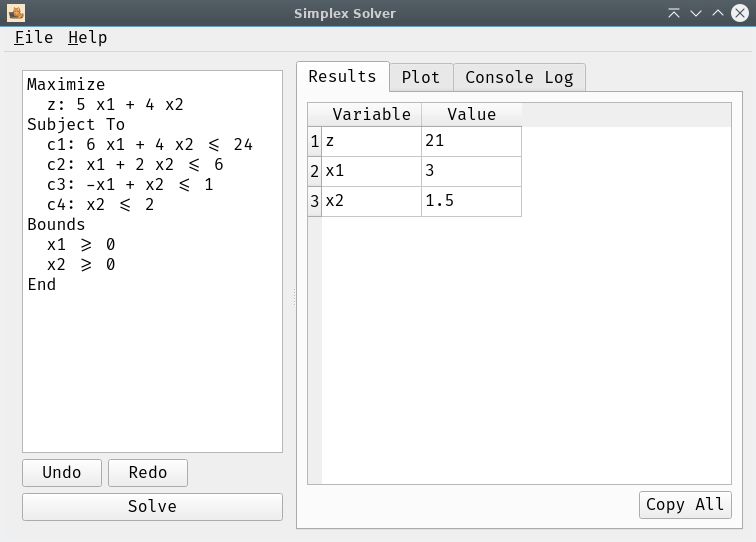
result.show_results()A user-friendly desktop application built with PySide6 (Qt for Python) provides an interactive environment for defining, solving, and visualizing linear programming problems.
- Input Widget: A text editor where you can type or load your problem definition.
- Results Table: Displays the optimal values for variables and the objective function.
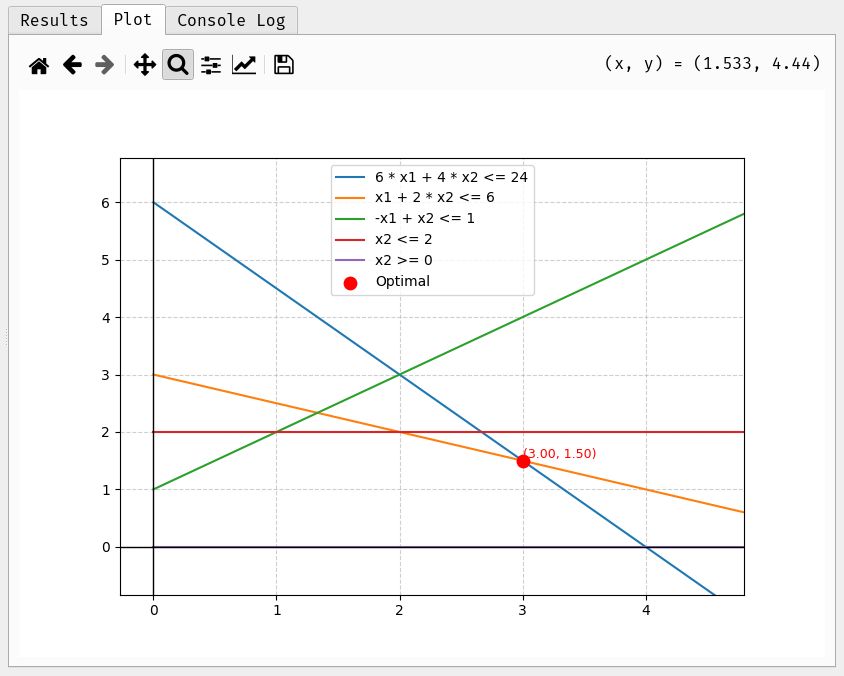
- Plotting: For problems with two variables, a dedicated tab visualizes the constraints and the optimal solution point.
- Console Log: Redirects and displays all terminal output (e.g.,
printstatements, error messages) within a dedicated tab in the GUI, ensuring readability by stripping ANSI escape codes. Includes a "Clear Console" button. - Menu Bar:
- File:
Open: Load problem definitions from.lpor.txtfiles.Save: Save the current problem definition from the editor to an.lpfile.Quit: Exit the application.
- Help:
About: Displays a custom dialog with application information, author, license, and links to GitHub and donation pages.
- File:
- User Experience:
- Responsive UI: The solver runs in a separate thread to prevent the application from freezing during calculations.
- Custom application icon (
pixel-cat.png). - Uses the FiraCode font for enhanced readability and a modern aesthetic.
- Clone the repository:
git clone https://github.com/xeland314/simplex.git cd simplex - Create a virtual environment (recommended):
python -m venv .venv
source .venv/bin/activate  # On Windows: .venv\Scripts\activate
- Install dependencies:
pip install -r requirements.txt
Run the basic interactive solver:
python simplex.pyIntegrate the DSLs into your Python scripts as shown in the "Domain Specific Languages (DSLs)" section above.
Launch the graphical interface:
python app.pyCheck the examples/ directory for sample .lp and .txt files that can be loaded into the GUI or used with the DSLs.
- Testing: Run all unit tests with:
This includes tests for the core simplex solver, DSLs, and the dual simplex implementation (
uv run python -m unittest discover
test_dual_simplex.py).
This project is licensed under the MIT License. See the LICENSE file for details.