
A full-featured PDF viewer with annotation support, built for Stimulus and the Hotwire ecosystem.
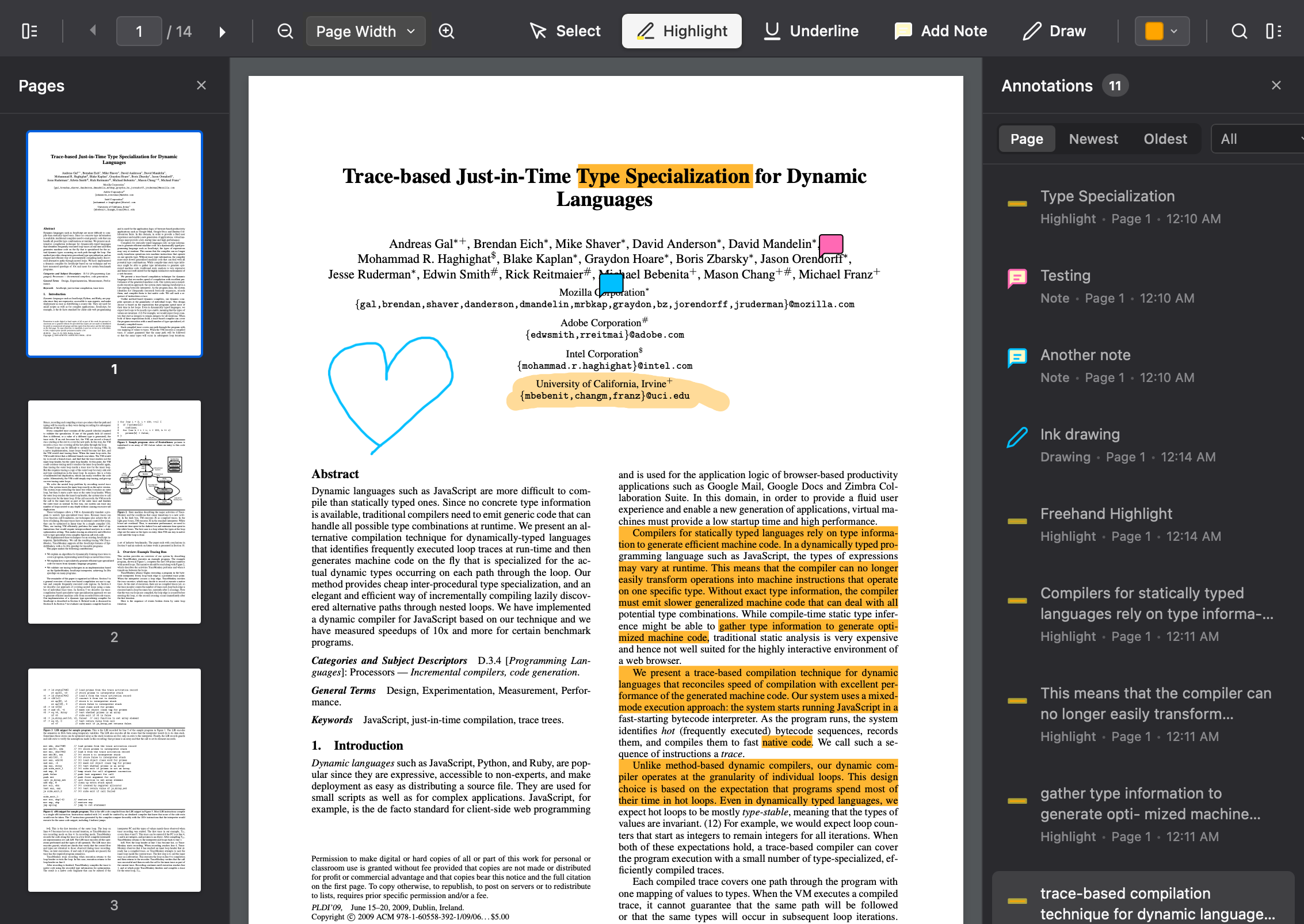
- PDF Rendering - Powered by Mozilla's PDF.js with lazy page loading
- Annotations - Highlights, underlines, sticky notes, and freehand drawing
- Search - Find text within the document with keyboard shortcuts
- Thumbnails - Page thumbnail sidebar for quick navigation
- Zoom Controls - Fit to page, fit to width, or custom zoom levels
- Watermarks - User-specific watermarks for document security
- Download - Export PDFs with annotations embedded
- Mobile Support - Touch gestures, responsive toolbar, pinch-to-zoom
- Accessibility - Screen reader support, keyboard navigation, high contrast mode
npm install stimulus-pdf-viewer @hotwired/stimulus @rails/request.js pdfjs-dist pdf-libOr with yarn:
yarn add stimulus-pdf-viewer @hotwired/stimulus @rails/request.js pdfjs-dist pdf-libOption 1: Download vendored files (Recommended)
Download the packages to your vendor directory:
bin/importmap pin stimulus-pdf-viewer pdfjs-dist pdf-lib --downloadThen download the PDF.js worker file separately:
curl -o vendor/javascript/pdfjs-dist--pdf.worker.js \
  "https://cdn.jsdelivr.net/npm/pdfjs-dist@4.9.155/build/pdf.worker.mjs"
Add the worker to your config/importmap.rb:
pin "pdfjs-dist/build/pdf.worker.mjs", to: "pdfjs-dist--pdf.worker.js"Option 2: Use CDN URLs
Add the following to your config/importmap.rb:
pin "stimulus-pdf-viewer", to: "https://ga.jspm.io/npm:stimulus-pdf-viewer@1.0.0/dist/stimulus-pdf-viewer.esm.js"
pin "pdfjs-dist", to: "https://ga.jspm.io/npm:pdfjs-dist@4.9.155/build/pdf.mjs"
pin "pdfjs-dist/build/pdf.worker.mjs", to: "https://ga.jspm.io/npm:pdfjs-dist@4.9.155/build/pdf.worker.mjs"
pin "pdf-lib", to: "https://ga.jspm.io/npm:pdf-lib@1.17.1/dist/pdf-lib.esm.js"import { Application } from "@hotwired/stimulus"
import { PdfViewerController, PdfDownloadController } from "stimulus-pdf-viewer"
const application = Application.start()
application.register("pdf-viewer", PdfViewerController)
application.register("pdf-download", PdfDownloadController)// In your application.scss
@import "stimulus-pdf-viewer/styles/pdf-viewer";Or copy styles/pdf-viewer.scss to your stylesheets directory.
Copy the cursor SVG files from assets/cursors/ to your asset pipeline (e.g., app/assets/images/pdf_viewer/).
Add a meta tag to configure the PDF.js worker path:
<meta name="pdf-worker-src" content="<%= asset_path('pdfjs-dist--pdf.worker.js') %>"><div data-controller="pdf-viewer"
data-pdf-viewer-document-url-value="<%= url_for(@document.file) %>"
data-pdf-viewer-document-name-value="<%= @document.name %>"
data-pdf-viewer-annotations-url-value="<%= document_annotations_path(@document) %>"
data-pdf-viewer-user-name-value="<%= current_user.name %>"
class="pdf-viewer-container">
<!-- Toolbar -->
<div class="pdf-toolbar">
<!-- See examples/rails/_toolbar.html.erb for full toolbar markup -->
</div>
<!-- Viewer body -->
<div class="pdf-viewer-body">
<div class="pdf-pages-container" data-pdf-viewer-target="container"></div>
</div>
<!-- Loading overlay -->
<div class="pdf-loading-overlay" data-pdf-viewer-target="loadingOverlay">
<div class="pdf-loading-spinner"></div>
<div class="pdf-loading-text">Loading document...</div>
</div>
</div>The PdfViewerController accepts the following Stimulus values:
| Value | Type | Description |
|---|---|---|
documentUrl |
String | URL to the PDF file |
documentName |
String | Display name for downloads |
annotationsUrl |
String | REST API endpoint for annotations |
trackingUrl |
String | (Optional) Endpoint for time tracking |
userName |
String | User name for watermarks |
organizationName |
String | Organization name for watermarks |
initialPage |
Number | Page to open on load (default: 1) |
initialAnnotation |
String | Annotation ID to highlight on load |
The viewer expects a REST API at annotationsUrl with these endpoints:
| Method | Path | Description |
|---|---|---|
| GET | {annotationsUrl}.json |
List all annotations |
| POST | {annotationsUrl} |
Create annotation |
| PATCH | {annotationsUrl}/{id} |
Update annotation |
| DELETE | {annotationsUrl}/{id} |
Delete annotation |
| PATCH | {annotationsUrl}/{id}/restore |
Restore deleted annotation |
{
  "id": "uuid",
  "page": 1,
  "annotation_type": "highlight|underline|note|ink",
  "color": "#FFEB3B",
  "opacity": 0.4,
  "quads": [{"p1": {"x": 100, "y": 200}, "p2": {...}, "p3": {...}, "p4": {...}}],
  "rect": [100, 200, 124, 224],
  "contents": "Note text content",
  "ink_strokes": [{"points": [{"x": 100, "y": 200}]}],
  "thickness": 2
}The viewer dispatches these custom events on the container element:
| Event | Description |
|---|---|
pdf-viewer:ready |
Document loaded and ready |
pdf-viewer:page-changed |
User navigated to a different page |
pdf-viewer:annotation-created |
New annotation created |
pdf-viewer:annotation-updated |
Annotation modified |
pdf-viewer:annotation-deleted |
Annotation deleted |
pdf-viewer:annotation-selected |
User selected an annotation |
pdf-viewer:scale-changed |
Zoom level changed |
pdf-viewer:error |
Error occurred |
Pass an onError callback when using the PdfViewer class directly:
const viewer = new PdfViewer(container, {
  documentUrl: "/path/to/document.pdf",
  onError: (error) => {
    // Send to your error tracking service
    Sentry.captureException(error)
  }
})For the easiest Rails setup, use the stimulus-pdf-viewer-rails gem which handles asset configuration automatically.
For manual integration, see examples/rails/ for complete Rails integration examples including:
- View partials for the viewer and toolbar
- Annotations controller
- Annotation model with validations
- Chrome/Edge 88+
- Firefox 78+
- Safari 14+
- Mobile Safari (iOS 14+)
- Chrome for Android
This project is dual-licensed:
- MIT License (LICENSE-MIT) - for original code
- Apache License 2.0 (LICENSE-APACHE) - for code derived from PDF.js
See the NOTICE file for attribution details.
Built with:
- PDF.js - PDF rendering engine (Apache 2.0). Portions of this library's rendering queue, text layer selection, and search functionality are derived from PDF.js patterns.
- pdf-lib - PDF manipulation for downloads
- Stimulus - JavaScript framework
- @rails/request.js - HTTP requests with Turbo Stream support