Authentication server for custom Hytale F2P setup.
This server handles authentication requests from both the game client (via the F2P launcher) and dedicated game servers. It implements the Hytale authentication protocol with Ed25519 JWT signing.
TG Group | TG Channel | Community Chat
Warning: This is an experimental project for educational purposes. Use at your own risk.
Click to view screenshots


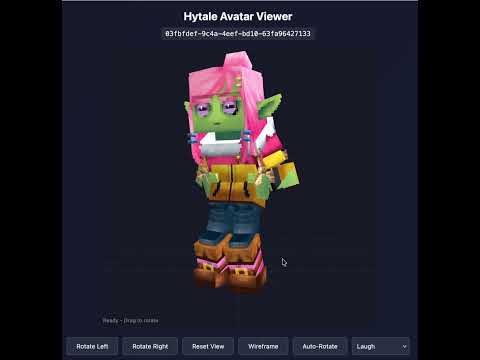
Live Demo: Avatar Customizer
You don't need to run your own auth server! A public test server is available at sanasol.ws and is used by default in all related projects.
- Download the pre-built launcher: Hytale F2P Launcher
- Connect to the public game server:
ht.vboro.de:5720
That's it! No auth server or game server setup needed for testing.
- All cosmetics unlocked - full access to character customization
- Cosmetics saved by username - your skin/cosmetic choices persist between sessions
Note: There is no password authentication - anyone can use any username. If you use a username someone else has used, you'll see their cosmetics. Use a unique username for testing.
Use play.hosting to get a free Hytale game server with F2P support — no hardware or setup needed:
- Register at play.hosting
- Create a Hytale server
- Start the server once and wait for it to fully load
- Go to Files → open the
modsfolder - Click New → File via URL
- Paste:
https://github.com/sanasol/hytale-auth-server/releases/latest/download/dualauth-agent.jar - Click Query and download the file
- Go to Console and Restart the server
Your F2P server is ready — both official and F2P players can join.
Alternatively, use the Hytale F2P Launcher source and hytale-server-docker with default settings - they're pre-configured to use sanasol.ws with dual auth support (both official and F2P players can play together).
Note: The public server is for testing purposes. For production use or privacy, set up your own server using this repository.
This is part of a complete Hytale F2P setup:
| Project | Description |
|---|---|
| hytale-auth-server | Authentication server + DualAuthPatcher (this repo) |
| Hytale F2P Launcher | Game launcher with dual auth support |
| hytale-server-docker | Dedicated server Docker image |
This repository contains the DualAuth Agent (dualauth-agent.jar) -- a runtime Java agent that enables multi-issuer authentication on Hytale servers without modifying the original server JAR.
- Dual-Auth: Accepts tokens from both official
hytale.comand custom F2P auth servers - Omni-Auth: Decentralized authentication via self-signed tokens with embedded JWKs -- no auth server needed
- Federated Auth: Automatic JWKS discovery for any third-party auth server
- Non-destructive: Original
HytaleServer.jarstays pristine (-javaagent:flag, no file modification) - Agent source:
dualauth-agent/ - Legacy patcher:
patcher/(deprecated, kept for reference) - Released as: GitHub Releases (
dualauth-agent.jar)
The same dualauth-agent.jar supports three loading modes:
| Mode | How | JVM Flags | Best For |
|---|---|---|---|
| Agent | -javaagent:dualauth-agent.jar |
None | Docker, dedicated servers |
| Plugin | Drop in mods/ folder |
-XX:+EnableDynamicAgentLoading |
Hosted panels (Pterodactyl) |
| Early Plugin | Drop in earlyplugins/ folder |
None | Singleplayer, LAN, no JVM flag control |
The early plugin mode lets official game owners host dual-auth servers directly from singleplayer -- no JVM flags, no server setup. Both official and F2P players can connect to the same world.
- Download
dualauth-agent.jarfrom GitHub Releases - Place it in your Hytale early plugins folder:
- Windows:
%LOCALAPPDATA%\Hytale\UserData\earlyplugins\dualauth-agent.jar - macOS:
~/Library/Application Support/Hytale/UserData/earlyplugins/dualauth-agent.jar
- Windows:
- Launch Hytale normally and start a singleplayer world
- Open to LAN / Online Play
- Share your server code with F2P players -- they can join using the F2P Launcher
That's it. Official players join normally through the game. F2P players connect using the launcher with the share code.
The early plugin system loads dualauth-agent.jar before the server starts and transforms authentication classes at load time. No -javaagent flag or -XX:+EnableDynamicAgentLoading needed -- the Hytale ClassTransformer API handles everything.
The agent automatically:
- Fetches F2P server tokens from
auth.sanasol.wson startup - Transforms JWT validation to accept both official and F2P tokens
- Routes auth requests to the correct auth server based on token issuer
In the game log (or console), look for:
DualAuth Early Plugin v1.1.19
Mode: EARLY PLUGIN (ClassTransformer)
Building a custom launcher, running your own auth server, or hosting a game server? See the onboarding guide:
Onboarding Guide -- How to make your project compatible with DualAuth servers. Covers Omni-Auth token generation, federated auth server requirements, public F2P API usage, game server hosting, and client patching.
Skip this section if you're using the public
sanasol.wstest server.
- Docker and Docker Compose
- A domain with 4-16 characters
- Default:
auth.sanasol.ws(14 chars, public test server) - Examples:
auth.example.com,my.server.io,game.host.net
- Default:
- DNS records pointing to your server
- (Optional)
Assets.zipfrom the game for cosmetics
Note: Both client and server patchers support variable-length domains from 4 to 16 characters. The unified endpoint approach routes all traffic to
https://{domain}(no subdomains needed).
git clone https://github.com/sanasol/hytale-auth-server.git
cd hytale-auth-serverEdit compose.yaml and set your domain:
environment:
  DOMAIN: "auth.yourdomain.com"  # Your auth domain (4-16 characters)
labels:
- "traefik.http.routers.auth.rule=Host(`auth.yourdomain.com`)"Create a DNS A record pointing to your server IP:
auth.yourdomain.com(or your chosen domain)
Note: The unified endpoint approach uses a single domain. No need for multiple subdomains (sessions., account-data., telemetry.) - the auth server handles all routes on one domain.
Copy Assets.zip from your Hytale game installation to enable all cosmetics:
cp /path/to/Hytale/Assets.zip ./assets/The Assets.zip is typically found in:
- Windows:
%LOCALAPPDATA%\Hytale\release\package\game\latest\Client\Assets.zip - macOS:
~/Library/Application Support/Hytale/release/package/game/latest/Client/Assets.zip
docker compose up -dcurl https://sessions.yourdomain/health
# Should return: {"status":"ok","server":"hytale-auth","domain":"yourdomain"}| Variable | Default | Description |
|---|---|---|
DOMAIN |
sanasol.ws |
Your domain (4-16 characters) |
PORT |
3000 |
Server port |
DATA_DIR |
/app/data |
Directory for persistent data |
ASSETS_PATH |
/app/assets/Assets.zip |
Path to Assets.zip for cosmetics |
REDIS_URL |
redis://localhost:6379 |
Redis/Kvrocks connection URL |
ADMIN_PASSWORD |
changeme |
Password for admin dashboard |
The server stores the following data in the data/ directory:
jwt_keys.json- Ed25519 key pair for JWT signing (auto-generated)user_data.json- User skin/cosmetic preferenceshead-cache/- Cached head embed images
Important: Keep jwt_keys.json backed up! If you lose it, all existing tokens become invalid.
Access at https://sessions.yourdomain/admin (requires ADMIN_PASSWORD).
- View active sessions and connected players
- Monitor server statistics
- Set custom display names for game servers
- View player avatars with embedded head previews
View any user's avatar in 3D with animations:
https://sessions.yourdomain/avatar/{uuid}
Features:
- 3D character rendering from
.blockymodelfiles - Animation playback (Idle, Walk, Run, Jump, Emotes, etc.)
- Skin tone and body type support
- Cosmetic parts rendering (hair, clothes, accessories)
Interactive character customization:
https://sessions.yourdomain/customizer/{uuid}
Features:
- Browse all cosmetic categories (Head, Torso, Arms, Legs, Capes)
- Live preview of cosmetic changes
- Color variations for supported items
- Animation preview
Embeddable player head images for use in admin panels, forums, etc:
https://sessions.yourdomain/avatar/{uuid}/head?bg=black
Query parameters:
bg- Background color:transparent,white,black, or hex color (e.g.,#ff0000)nocache- Set to1to bypass cache
Features:
- Server-side caching with disk persistence
- Proper HTTP caching headers (ETag, Last-Modified)
- Multiple background color options
Test page available at: https://sessions.yourdomain/test/head
A background service that pre-renders avatar heads for all active players using headless Chrome with Puppeteer. This ensures head images are cached before users request them, improving load times on the admin dashboard.
Features:
- Runs in a separate Docker container
- Uses WebGL software rendering (SwiftShader) - no GPU required
- Processes players in batches to avoid overloading the server
- Shares cache directory with main auth server
Configuration (environment variables):
| Variable | Default | Description |
|---|---|---|
AUTH_SERVER_URL |
http://hytale-auth:3000 |
Auth server URL for rendering |
REDIS_URL |
redis://kvrocks:6666 |
Redis/Kvrocks connection |
HEAD_CACHE_DIR |
/app/data/head-cache |
Cache directory path |
BG_COLOR |
black |
Background color for renders |
BATCH_SIZE |
5 |
Heads to render per batch |
LOOP_INTERVAL |
60000 |
Milliseconds between render loops |
Click to view all endpoints
| Endpoint | Method | Description |
|---|---|---|
/.well-known/jwks.json |
GET | JWKS for JWT signature verification |
/game-session/new |
POST | Create new game session |
/game-session/child |
POST | Create child session (used by launcher) |
/game-session/refresh |
POST | Refresh session tokens |
/game-session |
DELETE | Delete/logout session |
| Endpoint | Method | Description |
|---|---|---|
/game-session/authorize |
POST | Authorization grant for server connection |
/server-join/auth-grant |
POST | Alias for authorization grant |
/server-join/auth-token |
POST | Token exchange with certificate binding |
/game-session/exchange |
POST | Alias for token exchange |
| Endpoint | Method | Description |
|---|---|---|
/my-account/game-profile |
GET/POST | Get/update user profile |
/my-account/cosmetics |
GET | Get unlocked cosmetics |
/my-account/skin |
POST | Save user skin preferences |
/my-account/get-launcher-data |
GET | Get launcher-specific data |
/my-account/get-profiles |
GET | Get user profiles |
Used by game servers for commands like /ban, /kick, etc.
| Endpoint | Method | Description |
|---|---|---|
/profile/uuid/{uuid} |
GET | Look up player profile by UUID |
/profile/username/{username} |
GET | Look up player profile by username |
Headers for username lookup:
X-Server-Audience- Server audience ID (returns players on that server first)
| Endpoint | Method | Description |
|---|---|---|
/avatar/{uuid} |
GET | 3D avatar viewer page |
/avatar/{uuid}/head |
GET | Embeddable head image (PNG) |
/avatar/{uuid}/model |
GET | Avatar model data API |
/customizer/{uuid} |
GET | Avatar customizer UI |
/cosmetics/list |
GET | List all available cosmetics |
/cosmetics/item/{category}/{itemId} |
GET | Get specific cosmetic item |
/asset/{path} |
GET | Serve assets from Assets.zip |
/test/head |
GET | Head embed test page |
Requires ADMIN_PASSWORD environment variable. Token stored in browser localStorage.
| Endpoint | Method | Description |
|---|---|---|
/admin |
GET | Admin dashboard HTML page |
/admin/login |
POST | Login with password, returns token |
/admin/verify |
GET | Verify if token is valid |
/admin/stats |
GET | Lightweight server statistics |
/admin/servers |
GET | Paginated server list with players |
/admin/sessions |
GET | All active sessions |
/admin/server-name |
POST | Set display name for a server |
Protected endpoints require header: X-Admin-Token: {token}
Query params for /admin/servers:
page- Page number (default: 1)limit- Items per page (default: 10, max: 50)
| Endpoint | Method | Description |
|---|---|---|
/health |
GET | Health check |
/bugs/create |
POST | Bug report endpoint (no-op) |
/feedback/create |
POST | Feedback endpoint (no-op) |
For local testing without HTTPS:
docker compose -f compose.simple.yaml up -dThis exposes the server on http://localhost:3000.
-
Start the auth server (this repo):
cd hytale-auth-server docker compose up -d -
Start a dedicated game server (hytale-server-docker):
cd hytale-server-docker
# Edit compose.yaml to set HYTALE_AUTH_DOMAIN to your domain
docker compose up -d
-
Launch the game (Hytale F2P Launcher):
- Download from releases
- Or build from source:
git clone https://git.sanhost.net/sanasol/f2p-evo.git
cd f2p-evo
npm install
npm start
The launcher will:
- Patch the game client to use your domain instead of
hytale.com - Fetch authentication tokens from your auth server
- Launch the game with proper authentication
Your domain must be 4-16 characters. The patchers support variable-length domains within this range.
Make sure the auth server's Ed25519 keys are persisted. If the keys change, existing tokens become invalid. Check that data/jwt_keys.json exists and is not being recreated on each restart.
- Check that
Assets.zipis in theassets/directory - Check the server logs for cosmetics loading messages
- Verify the zip file is valid:
unzip -l assets/Assets.zip | grep Cosmetics
The viewer parses Hytale's asset format:
.blockymodel- 3D model definitions with bone hierarchy.blockyanim- Animation keyframe data- Greyscale textures with gradient-based coloring
- Character cosmetic configuration from
CharacterCreator/*.json
This is a reverse-engineering research project to understand Hytale's asset format.
MIT License - See LICENSE