An iMessage-style whisper client for World of Warcraft.
Replace the default whisper system with a modern messaging UI featuring chat bubbles, conversation threads, emoji, notification sounds, and more.




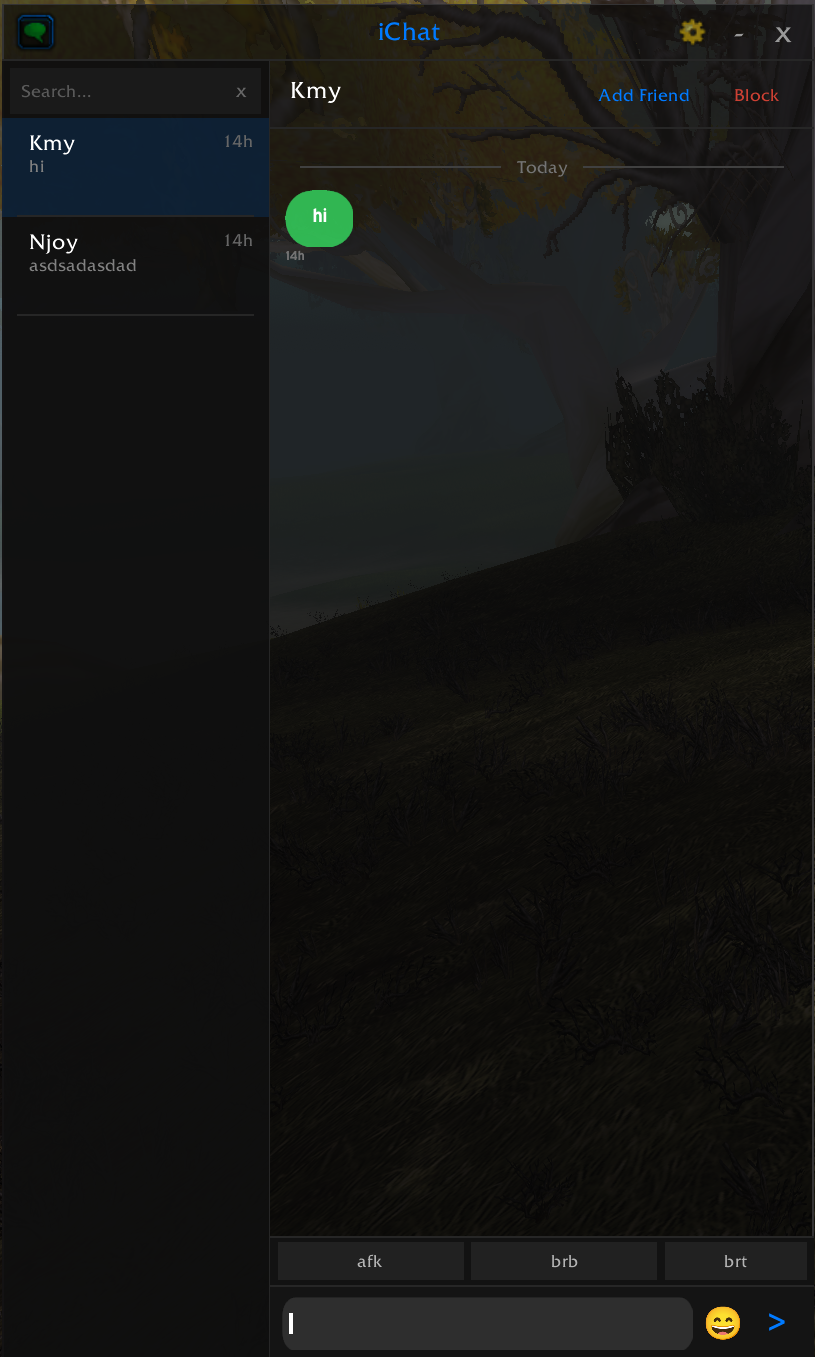
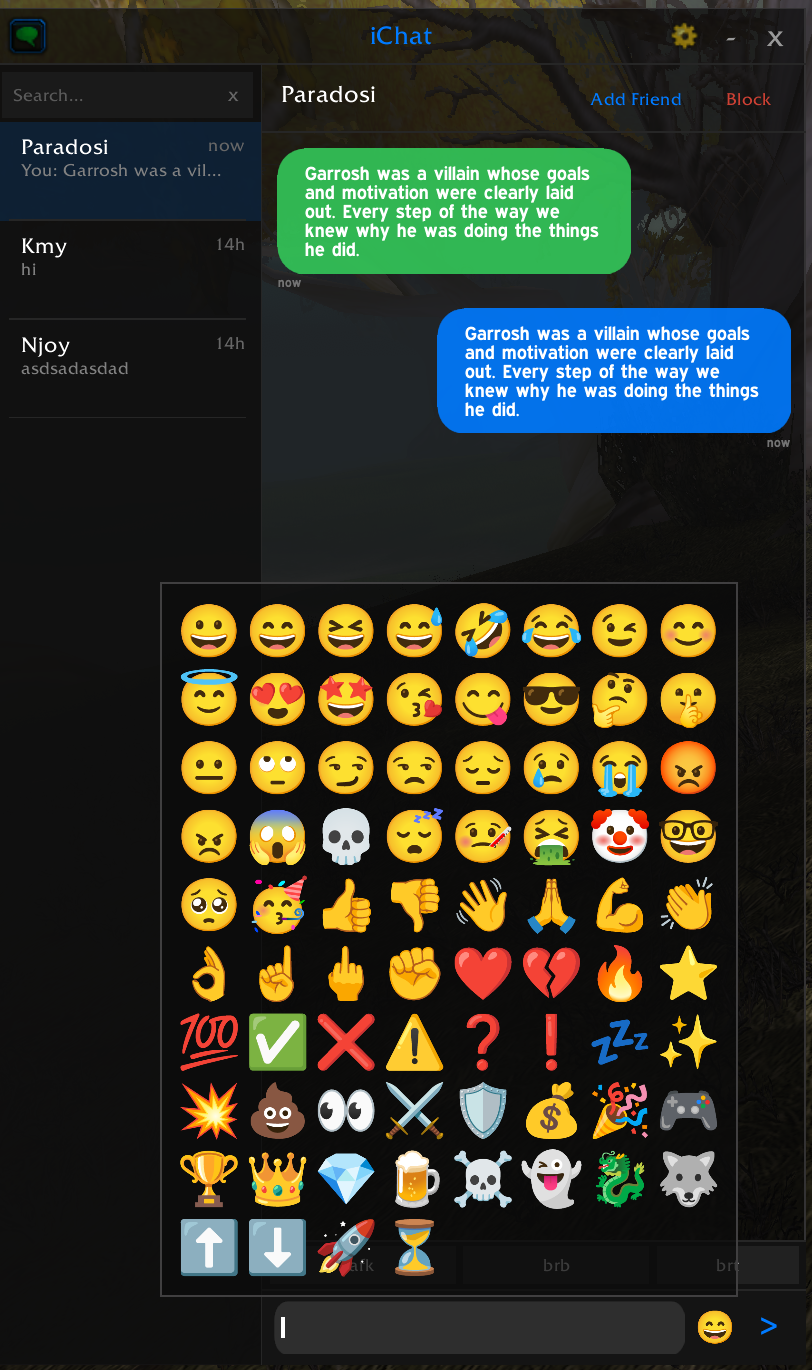
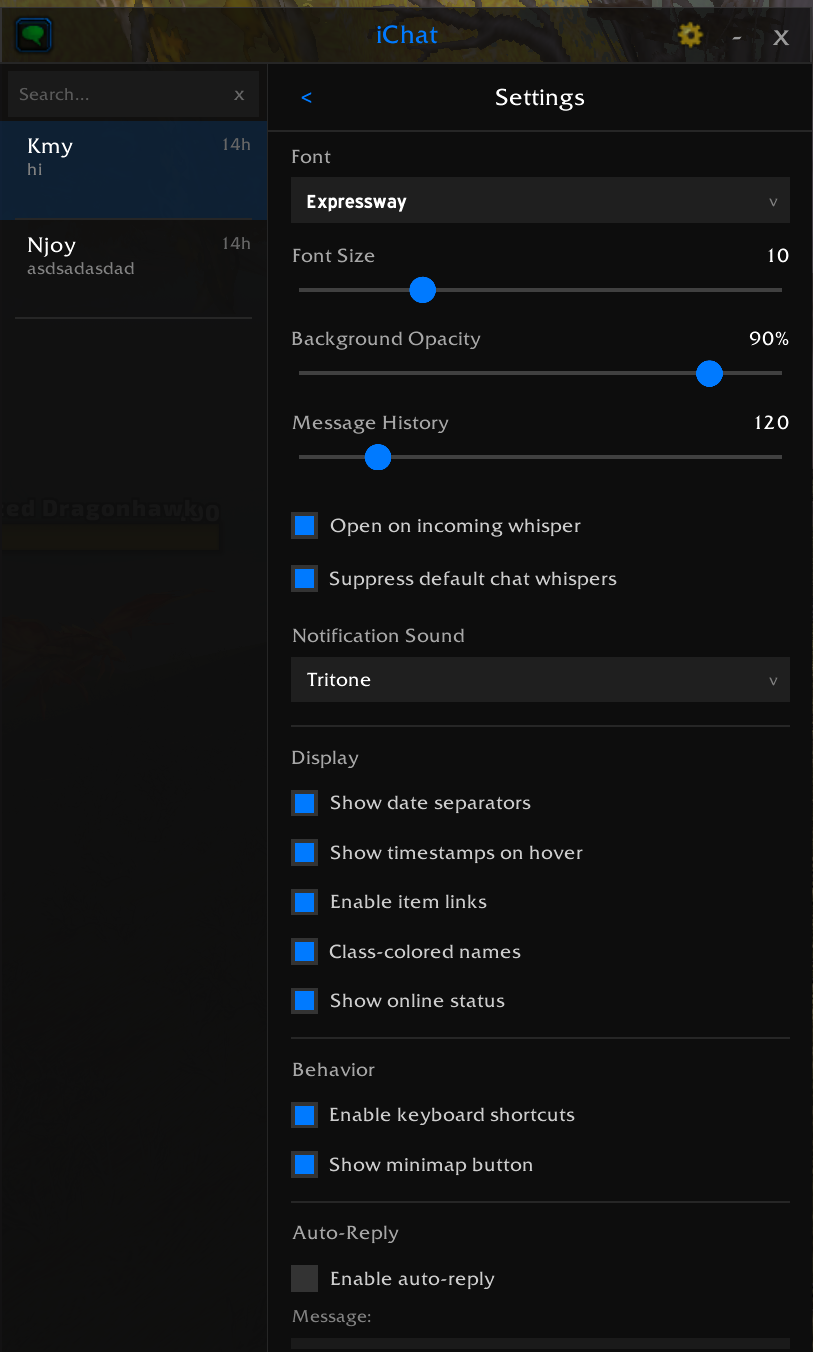
- iMessage-style chat bubbles with rounded corners (9-slice pill textures) and optional bubble tails
- Conversation list on the left panel, sorted by most recent activity
- Pinned conversations — pin favorites to the top of the list
- Unread badges on conversations with new messages
- "New Messages" separator — visual divider when scrolling to unread messages
- Date separators — "Today", "Yesterday", "Jan 5" between messages on different days
- Message previews in the conversation list
- Relative timestamps (now, 5m, 2h, etc.) — hover any bubble for exact time
- Resizable window (350x400 to 700x800) with drag-to-move
- Minimize to title bar with the
-button - ESC to close — registered with the UI special frames system
- Version displayed in title bar
- Blue (right-aligned) — your sent messages
- Blue (left-aligned, lighter) — incoming from friends
- Green (left-aligned) — incoming from non-friends
- "Sent" — gray indicator below your messages when delivery is confirmed by the server
- "Failed" — red indicator when the recipient is offline or not found
- Animated "typing..." in the conversation header when you're typing in the input box
- Cycles through "typing." → "typing.." → "typing..." animation
- Auto-clears after 2 seconds of inactivity
- Toggle in Settings → Behavior
- Clickable item/spell links in chat bubbles — hover for tooltip, shift-click to link
- Search bar — filter conversations by name or message content
- Keyboard shortcuts — Tab/Shift+Tab to cycle between conversations
- Right-click context menu — pin, mute, add note, or delete conversations
- Online status indicator — green dot for online friends, gray for offline
- Class-colored names — friend names colored by their WoW class
- Online/offline toast notifications — popup at top of screen when a friend you've chatted with comes online or goes offline. Click the toast to open their conversation. Toggle in Settings → Behavior.
- Full BNet (RealID) whisper support — send and receive whispers to Battle.net friends
- Smart display format — shows real name in the header, "Name (CharacterName)" in the conversation list
- BNet cyan-blue coloring — Battle.net names use Blizzard's signature cyan-blue throughout
- Character class colors — BNet character names shown in their WoW class color
- Cross-game messaging — message friends playing Diablo 3, Hearthstone, Overwatch, StarCraft, and more
- Game info display — header shows what game they're playing (e.g., "WoW: CharName (L60 Warrior)" or "Diablo 3")
- Mixed conversation list — BNet and regular whispers appear together, sorted by activity
- Chat filter — suppresses BNet whispers from the default chat frame (respects "Suppress whispers" setting)
- Native Titan Panel plugin — appears in your Titan bar alongside other plugins
- Left-click to toggle the iChat window
- Right-click for Titan Panel context menu with quick options
- Unread count display — shows unread message count (e.g.,
3,99+) or empty when caught up - Tooltip — hover for unread count and usage hints
- Optional — no errors if Titan Panel is not installed
- Level, race, class, and location displayed in the conversation header subtitle (e.g., "Lv70 Human Warrior Stormwind")
- 3D portrait when the player is visible as a unit (target, party, raid)
- Class icon fallback when a player is out of range but class is known — hidden entirely when no info is available (no question marks)
- Data sourced from friends list, guild roster, and visible units
- Guild rank shown in conversation header (green)
- Party role with tank/healer/DPS icon (blue)
- Raid membership indicator (orange)
- Updates automatically on roster changes
- Share conversations across characters — optional toggle in Settings → Behavior
- When enabled, all characters on the account share one conversation history
- Intelligently migrates existing per-character data when toggling on
- Off by default — each character has separate history
- Add Friend / Block buttons in the conversation header
- Contact notes — add a personal note for any contact (shown in header)
- Per-contact mute — suppress notification sounds for specific contacts
- Pin conversations — keep important contacts at the top of the list
- Compose button — start a new conversation with any player
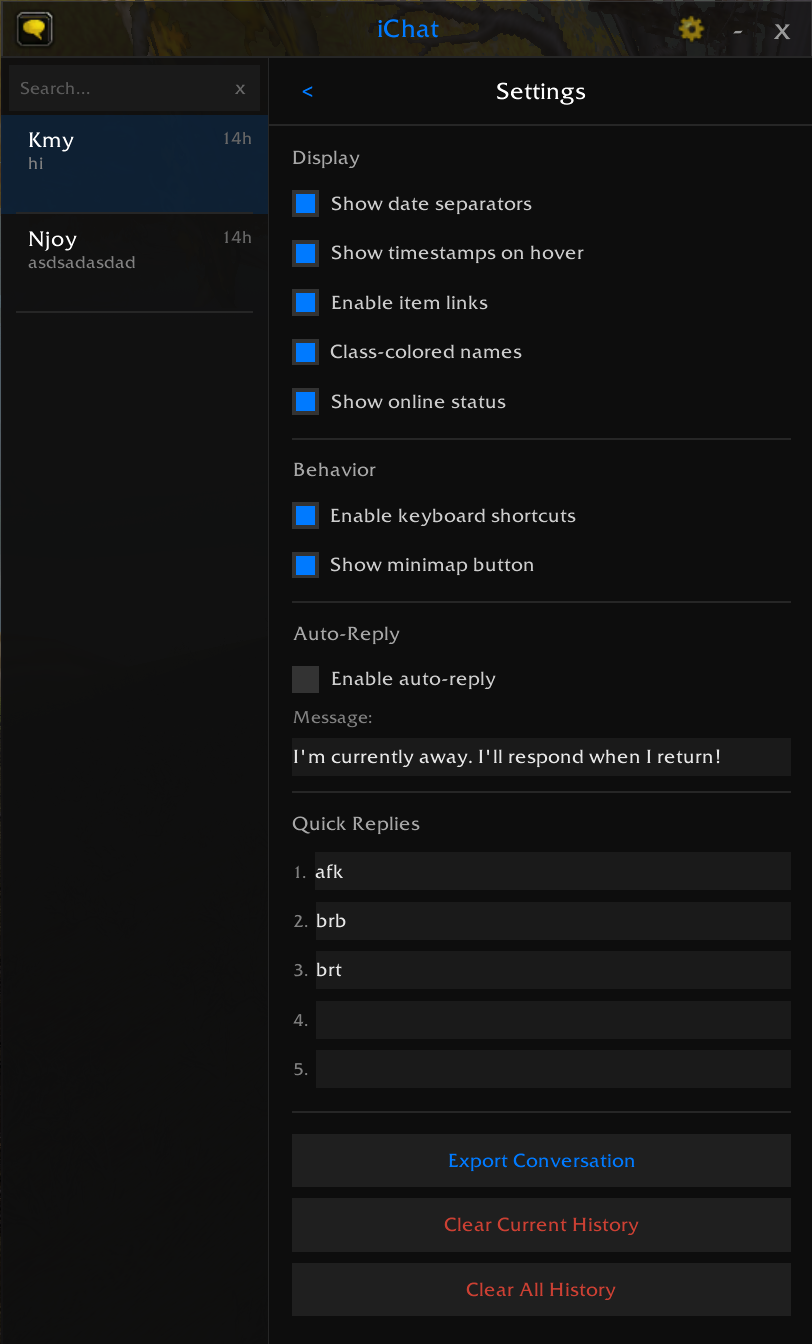
- 5 configurable quick reply buttons — set your own canned responses (afk, brb, etc.)
- Send via Enter key or the send button
- Configurable auto-reply — automatically responds to incoming whispers with a custom message
- One reply per contact per session — prevents spam
- Quick toggle —
/ichat autoreplyto enable/disable
- 75+ bundled emoji from Google's Noto Emoji — type
:shortcode:to use (e.g.:thumbsup:,:fire:,:heart:) - Emoji picker button next to the input box — click to browse and insert emoji
/ichat emoji— prints all available emoji with previews to chat- Emoji-Core support (optional) — if the Emoji-Core addon is installed, its emoji and autocomplete work alongside the built-in set
- 3 built-in notification sounds — Glass, Tritone, Chime
- LibSharedMedia support — any sounds registered by other addons (ElvUI, SharedMedia packs, etc.) appear as additional options
- Taskbar flash — the Windows taskbar icon flashes on incoming whisper
- Draggable floating button — left-click to toggle window, right-click for settings
- Faction-themed icon — blue shield for Alliance, red shield for Horde
- Unread badge — red dot with count for unread messages
- Whisper flash — pulses on incoming whispers until you open iChat
- Configurable button size (24–64px) — slider in Settings → Behavior
- Freely positionable — drag anywhere on screen, position saved between sessions
- LibDBIcon support — also registers with minimap button manager addons (MinimapButtonButton, etc.)
- Settings panel font size slider (8–14) — adjust the settings UI text size with smooth live preview
- Font selection dropdown — 6 built-in WoW fonts, plus all LibSharedMedia fonts if available
- Font size slider (8–16) for chat bubbles
- Background opacity slider (30%–100%)
- Message history slider (50–500 messages per conversation)
- Open on incoming whisper toggle
- Suppress default chat whispers toggle
- Display toggles — date separators, hover timestamps, item links, class colors, online status
- Window scale slider (0.5x–2.0x) — scales everything including fonts, icons, and buttons
- Behavior toggles — keyboard shortcuts, minimap button, hide in combat, auto-fade, fade while moving, typing indicator, online/offline notifications, ElvUI theme, shared account
- Auto-reply section — enable/disable with custom message editor
- Quick reply editor — configure up to 5 quick reply messages
- Export conversation — copy conversation history as plain text
- Clear history — per-conversation or all conversations (with confirmation)
- Auto-detect ElvUI and match backdrop, border, and accent colors
- ElvUI DataText — "iChat" appears in the DataText list (right-click any ElvUI info panel → select "iChat"). Shows unread count with ElvUI's value color. Left-click toggles the window, right-click opens settings.
- Only overrides font if you haven't explicitly chosen one
- Toggle in Settings → Behavior
Custom events for WeakAuras triggers:
ICHAT_WHISPER_RECEIVED(sender, text)ICHAT_WHISPER_SENT(target, text)ICHAT_FRIEND_ONLINE/ICHAT_FRIEND_OFFLINE(name)ICHAT_UNREAD_CHANGED(total)
- Window fades to 25% opacity after 1.5 seconds when the mouse leaves
- Instantly restores when hovering anywhere on the window (chat area, input box, conversation list — not just the title bar)
- Fade is disabled while the settings panel or emoji picker is open
- Fade while moving — optional setting to fade when your character moves, restores when stopped
- Can be fully disabled in Settings → Behavior → "Auto-fade when mouse leaves"
- Optional dependency — works without it, enhanced with it
- When LibSharedMedia-3.0 is available (bundled with ElvUI, etc.), all registered fonts and sounds appear in iChat's settings dropdowns
-
Download and extract to your AddOns folder. The same folder works for all WoW versions — the client automatically loads the correct TOC file:
Version AddOns Path TOC File Classic Era _classic_era_/Interface/AddOns/iChat/iChat_Vanilla.tocTBC Anniversary _anniversary_/Interface/AddOns/iChat/iChat.tocRetail _retail_/Interface/AddOns/iChat/iChat-Mainline.toc -
Restart WoW or
/reloadif already in-game.
| Command | Action |
|---|---|
/ichat |
Toggle the iChat window |
/ichat clear |
Clear the active conversation's history |
/ichat export |
Export current conversation to copyable text |
/ichat scale <n> |
Set window scale (0.5–2.0) |
/ichat emoji |
Print all available emoji shortcodes to chat |
/ichat autoreply |
Toggle auto-reply on/off |
/ichat search <text> |
Search conversations |
/ichat version |
Show version and storage mode |
- Click a conversation on the left, or use the compose button (chat bubble icon) to start a new one
- Type in the input box and press Enter to send
- Click the smiley button to open the emoji picker
- Use quick reply buttons for canned responses
- Custom keybind — bind "Toggle iChat Window" in WoW's Options → Key Bindings → iChat
- Tab — cycle to next conversation
- Shift+Tab — cycle to previous conversation
- Escape — close the window
Right-click any conversation in the list for:
- Pin / Unpin — keep at top of list
- Mute / Unmute — suppress notification sounds
- Add / Edit Note — personal note for the contact
- Delete Conversation — remove conversation and history
Type :name: in your message — it renders as an inline icon in the chat bubble.
Smileys: :grin: :smile: :laughing: :joy: :wink: :heart_eyes: :sunglasses: :thinking: :cry: :angry: :skull: :party: and more
Gestures: :thumbsup: :thumbsdown: :wave: :pray: :muscle: :clap: :ok_hand:
Symbols: :heart: :fire: :star: :100: :check: :x: :sparkles: :boom: :eyes:
Objects: :swords: :shield: :trophy: :crown: :gem: :beer: :dragon: :ghost: :rocket:
iChat uses two storage modes:
ICHAT_DATA(per-character) — default, each character has separate historyICHAT_ACCOUNT(account-wide) — optional, toggle "Share conversations across characters" in settings
Stored data includes:
- Conversation history — messages, timestamps, read state, delivery status
- Settings — font, font size, opacity, sound, quick replies, display/behavior toggles, auto-reply
- Pinned conversations — which contacts are pinned to the top
- Contact notes — personal notes per contact
- Muted contacts — contacts with suppressed notifications
Data persists across sessions. Use /ichat clear or the settings panel to manage history.
| Addon | What it adds |
|---|---|
| Emoji-Core | Unicode emoji autocomplete in the input box, additional emoji rendering |
| LibSharedMedia-3.0 | Extra fonts and sounds from other addons appear in settings |
| LibDBIcon-1.0 | Minimap button manager integration (MinimapButtonButton, etc.) |
| ElvUI | Auto-applies ElvUI's color theme to iChat |
| WeakAuras | Expose iChat events for custom triggers |
| Titan Panel | Native iChat plugin in the Titan bar with unread count |
- Classic Era (1.15.x) — Interface 11508
- TBC Classic Anniversary (2.5.x) — Interface 20505
- Retail (12.x Midnight) — Interface 120001
- WIM conflict: If WoW Instant Messenger (WIM) is installed, iChat automatically disables "Suppress default chat whispers" to avoid double-suppression.
- Typing indicator is local-only — only shows when you are typing. Cross-addon typing detection would require addon-to-addon messaging (both parties need iChat).
- ElvUI skin may not apply if ElvUI loads after iChat — a 1-second delay is used, but edge cases are possible. Toggle the setting off/on in that case.
- Author: paradosi (Dreamscythe)
- Emoji: Google Noto Emoji (Apache 2.0 License)
- Emoji Integration: Emoji-Core by KittenBall — optional emoji autocomplete and rendering library
