
Deep Fake Video/Image has been around since last decade where we are trying to mimic the behaviour, expression, lip and eye movement made by another person on top of another person, which is then synced to each other. These are then used for some illegal and legal activities by people like border crossing, financial thefts etc. So, in order to solve this problem, we can use the model above, where it helps us to identify whether a particular video fake or not using Transfer Learning and LSTM.
- https://www.researchgate.net/publication/341903582_Deepfake_Video_Detection_Using_Convolutional_Neural_Network
- https://ieeexplore.ieee.org/document/9544734
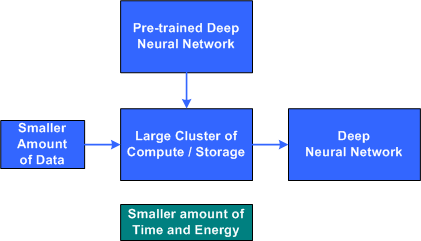
So, we have used Transfer Learning methodology to identify whether a given video has been altered or is it fake or not, as we all know, how hard it becomes to train and test a model on huge amount of data and still not getting that right accuracy that we wanted it really break your heart, I mean we spend like hours training that model and still not getting the right accuracy ewwww, so that we were transfer Learning comes into picture where we load a pretrained model, be it Resnet, Vgg16 or any other model. These models are trained on like millions of images and when we load and train this model on top of our images/ data the features on which the data has been previously trained gets shared by our data, in simple case, the weights of the previous model are shared by our data which we are trying to train, in that way our model will learn even better and provide better accuracy, than training it from scratch.

Reference:
So, before execution we have some pre-requisites that we need to download or install i.e., anaconda environment, python and a code editor. Anaconda: Anaconda is like a package of libraries and offers a great deal of information which allows a data engineer to create multiple environments and install required libraries easy and neat.
Download link:
Python: Python is a most popular interpreter programming language, which is used in almost every field. Its syntax is very similar to English language and even children and learning it nowadays, due to its readability and easy syntax and large community of users to help you whenever you face any issues.
Download link:
https://www.python.org/downloads/
Code editor: Code editor is like a notepad for a programming language which allows user to write, run and execute program which we have written. Along with these some code editors also allows us to debug, which usually allows users to execute the code line by line and allows them to see where and how to solve the errors. But I personally feel visual code is very good to work with any programming language and makes a great deal of attachment with user.
Download links:


Note: Make sure you have added path while installing the software’s.
- Install the prerequisites mentioned above.
- open anaconda prompt and create a new environment.
- conda create -n "env_name"
- conda activate "env_name"
- Install necessary libraries from requirements.txt file provided.
- Run pip install -r requirements.txt or conda install requirements.txt (Requirements.txt is a text file consisting of all the necessary libraries required for executing this python file. If it gives any error while installing libraries, you might need to install them individually.)
- Run python main_predict.py in your terminal, or run main_predict.ipynb. (The .py files should be executed on your terminal and .ipynb files should be executed directly in the code editor)
Note: For simplicity I have executed only the main_predict.py file by loading the weight of the model which was actually trained on huge amount of data, due to computational cost and time constraint and I have chosen to run only the main_predict file and giving it a feel by inserting the code in a GUI.
The Dataset can be downloaded from multiple sources given the links are below and some github repositories also host the dataset whcih can be downlaoded and trained on our model.
- https://www.kaggle.com/competitions/deepfake-detection-challenge/data
- https://github.com/yuezunli/celeb-deepfakeforensics/tree/master/Celeb-DF-v1
- https://github.com/ondyari/FaceForensics
Credits to the owners of the dataset.
- Installing specific face recognition library.
- Download the whl files from the the repository named face_recognition.
- open command prompt and located the path where you have saved your dlib files, then create an environemnt.
- pip install dlib-19.19.0-cp37-cp37m-win_amd64.whl, which ever version of python you use.
- pip install cmake
- pip install face_recognition
- Preprocessing and training the model takes lot of time since the datset is being trained on huge amount of data.
- We might face an issue while installing specific libraries.
- Make sure you have the latest version of python, since sometimes it might cause version mismatch.
- Adding path to environment variables in order to run python files and anaconda environment in code editor, specifically in visual studio code.
- Make sure to change the path in the code where your dataset/model is saved.
All the required data hasn't been provided over here. Please feel free to contact me for dataset or any issues. abhiabhinay629@gmail.com
