


A Copier template I wrote for myself for starting Python backend projects.
copier copy gh:aidrecabrera/flint my-project --trustThis exists because scaffolding is annoying. I got tired of burning time on the same setup work over and over:
- project layout
- pyproject
- uv
- ruff
- tests
- type checking
- FastAPI setup
- SQLModel setup
- auth wiring
- Docker for local Postgres
- CI
None of this is hard. It is just repetitive. And repetitive setup work is a good way to waste time and still end up with something inconsistent.
So I wrote the template I wanted to keep using myself.
It is also inspired by the backend structure in Polar, especially the idea of keeping things organized around FastAPI modules, auth-aware routing, and a backend layout that is practical instead of decorative.
You need the following installed on your system before using this template:
- uv - install with:
# macOS / Linux
curl -LsSf https://astral.sh/uv/install.sh | sh

# Windows
powershell -ExecutionPolicy ByPass -c "irm https://astral.sh/uv/install.sh | iex"
- just - install with:
# macOS
brew install just

# Linux
curl --proto '=https' --tlsv1.2 -sSf https://just.systems/install.sh | bash -s -- --to /usr/local/bin

# or via cargo
cargo install just
- Docker (optional) - only needed if you choose PostgreSQL or enable Docker for the app. Install via Docker Desktop or your system package manager.
- Copier - install with:
uv tool install copier
copier copy gh:aidrecabrera/flint my-project --trustcd my-project
cp .env.example .envIf you chose PostgreSQL:
just dbInstall dependencies:
just installIf the project uses a database:
just revision "initial"
just migrate
Start the app:
just devThen open:
This template generates a FastAPI project with a few defaults already decided.
You choose:
- whether the project uses a database
- whether it uses JWT auth
- whether the app itself should be containerized with Docker
If you choose PostgreSQL, the generated project also includes Docker Compose for local database development.
Because scaffolding is painful.
Every time I start a backend project, I end up doing the same things:
- making the same files
- writing the same commands
- checking the same docs
- fixing the same annoying setup details
- deciding the same tool choices again even though I already know what I want
That is dumb.
The question I asked myself before writing this template:
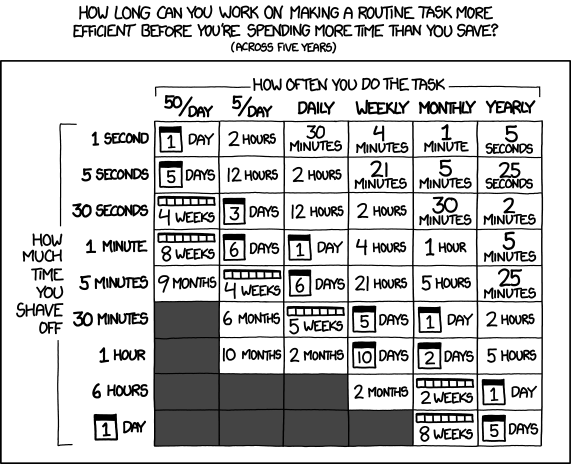
XKCD 1205 - on whether automating repetitive work is worth the upfront effort.
spoiler
yes
Then, naturally:
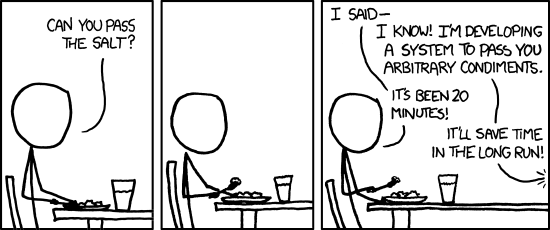
XKCD 974 - the developer instinct to solve the fully general version of a specific problem instead of just doing the specific thing.
The point of a project template is not magic. It is just refusing to redo boring work badly.
So this template makes the boring decisions once and keeps them out of the way.
Every generated project includes:
- FastAPI
- uv
- ruff
- pyright
- pytest
- just
- pydantic-settings
- GitHub Actions
- a health endpoint
- a small test setup
- a
pyproject.toml - a generated
README.md
If you enable a database, it also includes:
If you enable auth, it also includes:
- JWT auth using FastAPI's OAuth2 password flow
- password hashing with
pwdlib - register / login / me routes
If you choose PostgreSQL, it also includes:
- a
docker-compose.ymlwith a local postgres service just db,just db-stop, andjust db-logs
If you enable Docker for the app, it also includes:
- a
Dockerfile - an app service in
docker-compose.yml
These choices are not configurable:
- FastAPI
- SQLModel when a database is enabled
- Alembic when a database is enabled
- uv
- ruff
- pyright
- pytest
- just
- GitHub Actions
If you do not want these specific choices, this is the wrong template for you. Popular alternatives include:
- The official full-stack-fastapi-template (full-featured with React frontend, by the FastAPI team)
- s3rius/FastAPI-template (highly configurable with multiple ORMs and databases)
- jlevy/simple-modern-uv (minimal, modern Python + uv template)
- fastapi-practices/fastapi-best-architecture (enterprise-style architecture with Celery, etc.)
That is fine. Use something else, or fork this and change it.
The template only asks for the things that actually change the project:
database:none,sqlite, orpostgresauth:noneorjwtdocker:trueorfalse
A typical generated project looks like this:
project/
├── app/
│   ├── main.py
│   ├── config.py
│   ├── errors.py
│   ├── routers/
│   │   └── health.py
│   ├── db.py
│   ├── dependencies.py
│   ├── models.py
│   └── auth/
│       ├── models.py
│       ├── schemas.py
│       ├── utils.py
│       ├── dependencies.py
│       └── routes.py
├── tests/
├── alembic/
├── .github/workflows/ci.yml
├── .env.example
├── .python-version
├── justfile
├── pyproject.toml
├── README.md
└── docker-compose.yml
The exact files depend on the options you chose.
Always available:
just install
just dev
just test
just lint
just fmt
just typecheck
just check
If the project uses a database:
just revision "message"
just migrate
just downgrade
If the project uses PostgreSQL:
just db
just db-stop
just db-logs
If the project includes app Docker support:
just up
just down
just logsThis template does not eliminate thinking. It just removes setup repetition.
You still have to do the real work yourself.
That includes:
- deciding your actual domain model
- writing real routes
- designing your schema properly
- reviewing generated migrations before applying them
- changing defaults that are wrong for your app
- setting a real
SECRET_KEY - deciding how you want to deploy
- deciding whether you really want JWT auth or something else
- organizing the code further if the project grows
- deleting parts you do not need
If you picked auth, you should understand the auth code.
If you picked a database, you should understand the models and migrations.
If you picked Docker, you should understand what the container is doing.
The template gives you a working starting point. It does not absolve you from knowing what you are running.
That would be a stupid way to build software.
This follows the FastAPI docs fairly closely, especially around:
I like SQLModel, so it is the default when a database is enabled.
This means there is no ORM choice in the template. If I wanted plain SQLAlchemy instead, I would use a different template.
This uses sync SQLModel sessions, the default in the official FastAPI + SQLModel docs. FastAPI runs sync dependencies in a threadpool, so this works fine for most backends.
SQLModel does support async, but the official async documentation is still minimal
(it is listed as a planned feature in the Advanced User Guide).
It also adds real complexity (extra drivers, greenlet, and frequent MissingGreenlet errors with lazy loading).
If you need async support, swap create_engine to
create_async_engine
and Session to
AsyncSession
(from sqlmodel.ext.asyncio). The rest of the app stays mostly the same.
Alembic is included and configured so migrations work immediately.
That does not mean you should blindly trust autogenerated migrations. Read them.
There is no logging setup in the template beyond what FastAPI and the server already do.
Not because those tools are bad. They just do not belong in the base template I want.
If a project needs them, add them: YAGNI.
Because this uses Copier, generated projects can be updated later:
copier update --trustI care about this mostly because I want to keep using the template myself and pull improvements back into projects created from it.
If you use the template too, you can do the same.
These are the main docs this template is based on:
- FastAPI
- FastAPI SQL databases tutorial
- FastAPI security tutorial
- FastAPI Docker docs
- SQLModel
- uv
- Ruff
- Copier
- just
- Polar backend inspiration
Fork it. Change it. Remove things you do not like.
This is mainly a personal template that I open-sourced. Issues, PRs, and suggestions are welcome, especially if you find bugs or have ideas that would make the defaults better.
This template is licensed under the MIT License. See the LICENSE file for details.