Welcome to Agent-Bridge.
Agent-Bridge is a persistent workspace platform for AI coding agents. It combines a PTY daemon, backend API, canvas frontend, and a deploy/orchestration root so the whole stack can be cloned and started from one place.


Persistent agent workspaces, terminal sessions, canvas coordination, and deploy orchestration from a single root.
Current release series:
v0.1.6
For a one-command local demo stack with frontend, backend, PTY, and docker demo agents:
docker compose --env-file .env.quick-start -f docker-compose.quick-start.yml up -dOr with a curl-style installer:
curl -fsSL https://raw.githubusercontent.com/agent-bridges/ab/master/install.sh | bashThis mode does not require copying .env, does not require cloning child repos, and uses the checked-in .env.quick-start defaults plus isolated ./state/quick-start/* paths.
Stop a repo-local quick start with:
docker compose --env-file .env.quick-start -f docker-compose.quick-start.yml downRemove a curl-installed quick start with:
docker compose --env-file ~/.agent-bridge/.env.quick-start -f ~/.agent-bridge/docker-compose.quick-start.yml down -v --remove-orphans
rm -rf ~/.agent-bridge
Open it:
http://127.0.0.1:5281
Default login:
- username:
admin - password:
admin
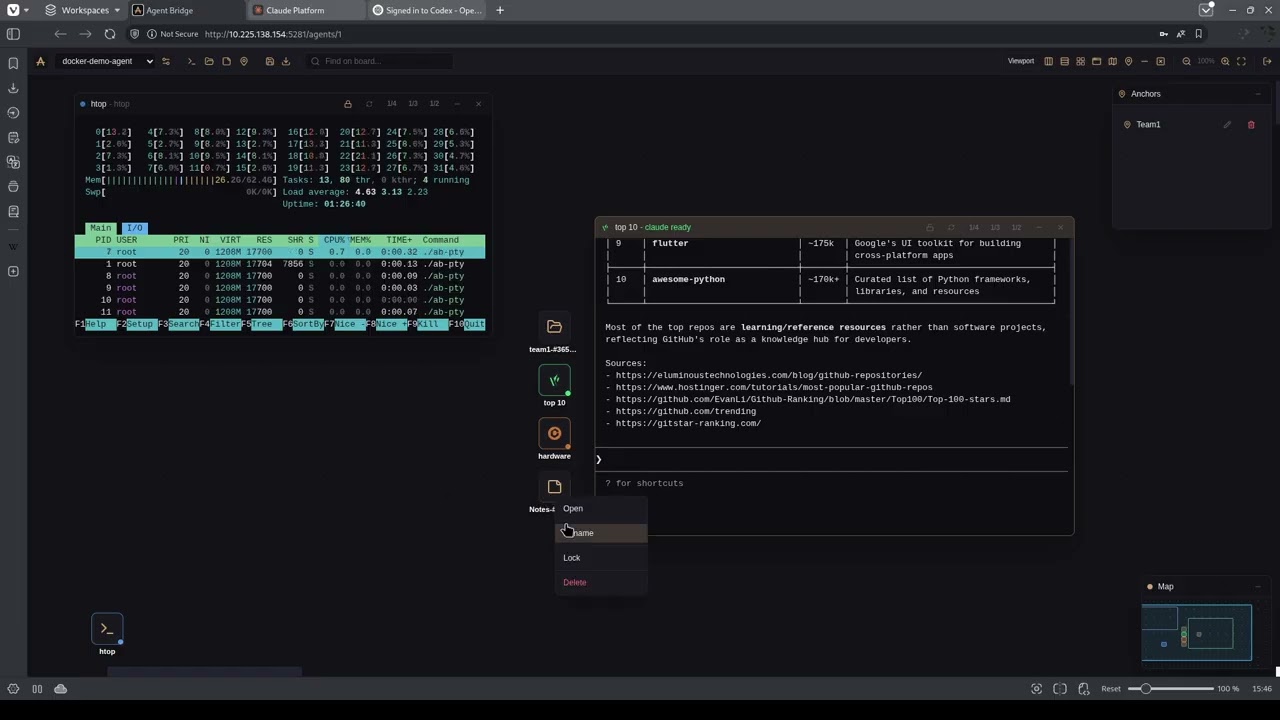
- agent-scoped canvas boards
- fully separate per-agent workspaces, including viewport and system panel state
- terminal, files, notes, and anchor components
- non-PTY components persisted per agent through the backend
- draggable and resizable windows
- window lock to exclude a window from global layout operations
- right-click canvas menu for creating components
- toolbar quick search for board items with jump-to-focus navigation
- PTY daemon connection settings modal for add/edit/delete/test agent connections
- per-agent saved layout snapshots stored on the backend
- minimap with viewport tracking
- anchors panel for listing anchors and centering the board on them
- layout scope switcher with
viewport,world, andrulersmodes - draggable ruler guides for defining a viewport-local tiling region
- viewport-pinned icons with a separate viewport layer and grid
- double click on an icon centers the viewport on its window and reopens the window if it is hidden
- file manager action for creating a PTY session in the current or selected directory
- agent registry and agent management API
- per-agent non-PTY board component persistence API
- server-backed per-agent canvas layout snapshot storage
- PTY proxy and PTY session management
- file system and process proxy APIs
- SSH bootstrap disabled by default and opt-in only
- PTY daemon for bash, GPT/Codex, and similar AI terminal sessions
- session lifecycle management
- file system access for agent workspaces
- recursive mkdir recovery endpoint
- host daemon deployment flow via published release artifact
- published daemon binaries:
linux/amd64 (glibc)andlinux/arm64 (glibc)
- isolated disposable test environment
- fresh test DB and state paths
- two pre-seeded remote docker agents
- one-command bring-up and teardown
- test login:
admin / admin
Use this when you want to run Agent-Bridge from published frontend/backend images plus the locally built PTY runtime layer.
- Clone the deploy root:
git clone https://github.com/agent-bridges/ab.git
cd ab- Create a backend JWT secret file:
mkdir -p state/back
openssl rand -hex 32 > state/back/jwt-secret- Create
.env:
cp .env.example .envSet:
AB_JWT_SECRET_PATH=/absolute/path/to/ab/state/back/jwt-secretAB_WORKSPACE_PATH should point to the absolute path of the ab checkout. scripts/bootstrap.sh seeds it automatically when .env is first created.
- Bootstrap and start:
scripts/bootstrap.sh
scripts/stack.sh up --mode prod
Default install seeds one docker-based demo agent into the main backend database and starts its daemon container automatically.
For a clean install without demo data or the extra demo daemon:
scripts/stack.sh up --mode prod --skip-test-dataUse this when you want bind mounts and live source changes inside containers.
For development, test/demo, and local release work, also clone the child repositories into the root:
git clone https://github.com/agent-bridges/ab-back.git ab-back
git clone https://github.com/agent-bridges/ab-front.git ab-front
git clone https://github.com/agent-bridges/ab-pty.git ab-pty
Then start the bind-mount development stack with:
scripts/stack.sh up --mode devDefault developer mode also starts the demo agent container and seeds docker-demo-agent into the main backend DB.
For a clean developer stack without demo data:
scripts/stack.sh up --mode dev --skip-test-datascripts/stack.sh up --mode prod: image-based install modescripts/stack.sh up --mode dev: bind-mount development modedocker compose --env-file .env.quick-start -f docker-compose.quick-start.yml up -d: one-command quick-start demo mode--skip-test-data: disables the default demo agent and demo seeding in prod/dev modes
To run the default stack you need:
dockerdocker composebashcurlpython3realpathopenssl
This repository is the deploy/orchestration root for Agent-Bridge.
It is the single entry point for:
ab-backab-frontab-pty
ab is not a monorepo. Child repos are required for development, test/demo, and local release work, but the default production-style startup only requires the root checkout.
Expected directory layout:
ab/
  .env
  .env.example
  docker-compose.yml
  docker-compose.demo.yml
  docker-compose.dev.yml
  docker-compose.dev-demo.yml
  docker-compose.test.yml
  scripts/
  docs/
  ab-back/
  ab-front/
  ab-pty/
- ab-back - backend API and orchestration logic
- ab-front - primary canvas frontend
- ab-pty - PTY daemon
Default scripts/stack.sh up --mode prod launches backend/front from published images and builds the local PTY runtime layer from the root repo.
The local PTY runtime layer downloads the published ab-pty daemon binary for:
-
linux/amd64 (glibc) -
linux/arm64 (glibc) -
ab-front:5281 -
ab-back:8520 -
ab-pty: internal only -
agent-demo: internal only, seeded by default for install-mode validation
Open these on your deployment host or hostname, for example:
http://127.0.0.1:5281http://127.0.0.1:8520
Check containers:
scripts/stack.sh ps --mode prodCheck backend health:
curl http://127.0.0.1:8520/health
curl http://127.0.0.1:8520/api/auth/status
Useful helpers:
scripts/stack.sh logs --mode prod
scripts/stack.sh down --mode prod
The same scripts accept --skip-test-data if you want to operate only on the clean stack definition without the default demo agent:
scripts/stack.sh ps --mode prod --skip-test-data
scripts/stack.sh logs --mode prod --skip-test-data
scripts/stack.sh down --mode prod --skip-test-data
Development helpers:
scripts/stack.sh ps --mode dev
scripts/stack.sh logs --mode dev
scripts/stack.sh down --mode dev
They also support --skip-test-data for a clean developer stack without the demo agent.
For a disposable test stack with a fresh test DB and two pre-seeded docker remote agents:
scripts/test-up.shIf the test stack is already running, the script asks whether to remove and recreate it. If you answer no, it exits without changing the current test environment.
Before startup, the script checks:
- required local tools
- that the test ports are free on
127.0.0.1
This starts an isolated compose project with:
- test
ab-fronton5381 - test
ab-backon8620 - docker test agent 1 health on
19421 - docker test agent 2 health on
19422
Default test login:
- username:
admin - password:
admin
Seeded test agents:
docker-test-agent-1docker-test-agent-2
Stop it with:
scripts/test-down.shDefault host-daemon flow:
scripts/daemon-deploy.sshscripts/daemon-deploy.ssh now downloads the published ab-pty release artifact for the remote host architecture and deploys it over SSH.
The wizard supports:
- SSH alias mode from
~/.ssh/config - host or
user@hostplus private key mode - release tag selection
- overwrite or inspect-existing flow
- returning the daemon address and onboarding JWT for agent creation
For local development or emergency fallback, a manual artifact build is still available:
scripts/build-daemon-artifact.sh
AB_PTY_ARTIFACT_SOURCE=local scripts/daemon-deploy.ssh
Local fallback artifact path:
ab-pty/.artifacts/ab-pty-linux-amd64-glibc
AGENTS.md- operator notes for agentic coding toolsdocs/TOPOLOGY.md- repository and runtime topologydocs/DEPLOY.md- deployment and runtime policy